Hello everyone I am finally in the process of making my first frame (something I’ve wanted to do for 15 years). I have quite a bit of fabrication and TIG welding experience, but nothing on designing and building a bike frame. I’m thinking a fame design program might be a valuable tool for tube lengths and notching angles. What program do you prefer? I’m open to using a CAD program as well, looking at usability, features and price. Thank you for your input.
1 Like
I use this:
Thank you for sharing that and putting so much work into creating it. I’m going to try and learn how to use it, I think I might be to dumb.
2 Likes
I haven’t used @guy153’s software or RattleCAD but I bought BikeCAD a few years ago and am very happy I did. Even though I’ve only made one frame so far. It will help you with all the frame-building specific stuff (jig setup, miter dimensions, miter templates, etc.) and also allows you to model a bike frame and all the contact points (pedals, saddle, bars) accurately which really makes it easy to figure out ya design.
3 Likes
as a career draftsman/designer just get BikeCAD. RattleCAD is good, excellent even but I think BikeCAD is a bit more user friendly inerface wise. I use AutoCAD because it’s super familiar to me and it’s free for me at the moment. ie. workplace licence. I would probably slide across to Fusion if I have to start paying for it but I’m building full bounce bikes and need the modelling function of a CAD program that BikeCAD doesn’t give me.
2 Likes
imo bikecad is too expensive for a hobbyist, at least for this hobbyist. the free version is fun to play around in but doesn’t get me where i need to be. idk, maybe it’s a skill issue on my part.
i like fusion360 not-for-commercial-use edition
2 Likes
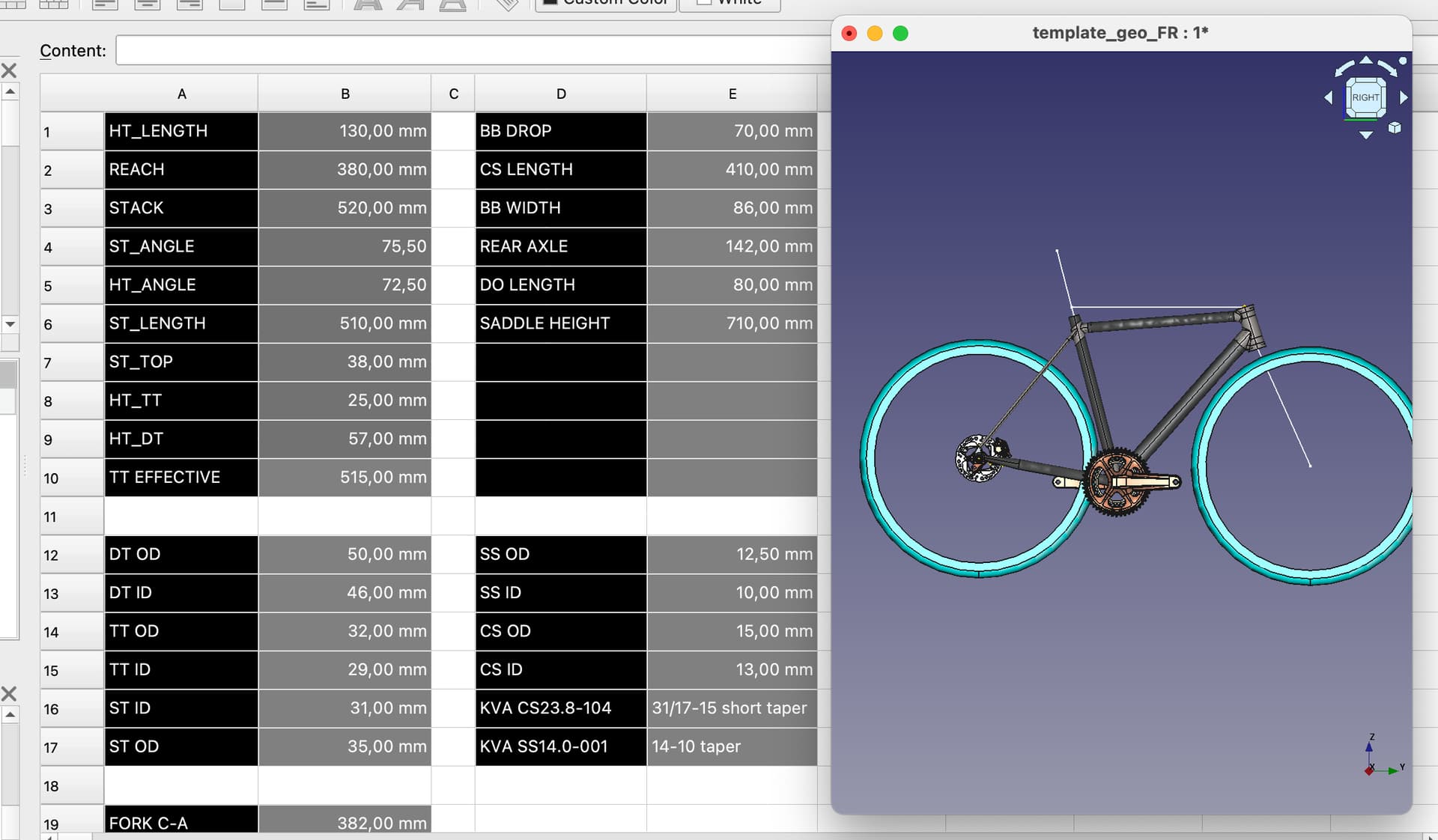
Starting as hobby I’m still using RatteCAD for drafting bike geometry and FreeCAD for 3D modeling—until now still in free open source software. I think I haven’t max out their free capabilities
Just last month I make spreadsheet base parameter for one of my bike model that use 3D printed lug that I build with freeCAD, open source software today is very descent especially backed with their community 
1 Like
Fellow hobbyist here. I’ve used the free version of BikeCAD, RattleCAD and BikeCAD Pro to successfully build different frames over the years.
If you can afford it, get BikeCAD Pro, if not, get RattleCAD. If you don’t want to spend any money, use the free version of BikeCAD and do a full-scale drawing on paper.
3 Likes
My first 2 frames I just drew full scale drawings. Was definitely a worthwhile endeavor IMO as I think it gave me a solid knowledge foundation before getting the access to the design shortcuts that cad softwares enable. I think it’s a lot easier to see a small but consequential mistake in a drawing than it is on bikecad/rattlecad as everything still looks like a bike on screen unless something is wildly off. Additionally you tend to write absolutely every measurement & angle possible down on a drawing, whereas you might miss something if is toggled off on the screen. You also learn good skills like finding/checking/cutting miter angles without a paper template.
That being said, I was introduced to bikecad in Daneille Schön’s framebuilding foundations course & now I do use bikecad for most of the process now (currently working on frame #5 & #6), as it’s definitely super useful & timesaving technology. But I feel like wouldn’t be as comfortable with it if I hadn’t drawn out some frames first. In fact, I’m still drawing bent/tapered chainstays & seatstays because it feels faster & easier for me than inputting all necessary measurements & angles into bikecad.
Paul Brodies drawing procedure is essentially the same as what I did https://youtu.be/iDx8c7Tq4PY?si=D2WoM6XrK5c2F2Ed
2 Likes
Thank you for all the great replies. You have all been very helpful. I am going to get BikeCad once I get a new laptop. Is there anything special I should look for as far as RAM or graphics cards to run it?
1 Like
I don’t think the HW requirements are too high. I’m a devoted BikeCAD Pro user for 5+ years now. Brent is awesome and I think he’s got something posted on the forum now about working with hobby builders to make it more affordable. BikeCAD can get a bit overwhelming and when updates happen, it’s a challenge to get back all of the customizations, templates and views that I have setup.
I will also say RattleCAD does some things that I think are better than BikeCAD. I don’t have a computer/screen in my shop so, I print stuff out. RattleCAD enables several views to output as PDF and printed as one document which is really handy to have it all printed out on my bench as I work.
3 Likes